How Texas E-Filing Works
Understand the filer, EFM, clerk, and court systems, from draft preparation through acceptance and service.
The People and Systems Involved
Texas uses a statewide electronic filing system, eFileTexas, to deliver filings between filers and participating courts. You work through an electronic filing service provider, or EFSP. Referlex is the interface where you prepare the information and documents for that delivery. The provider sends the filing to the electronic filing manager, or EFM, which routes it for court review. A clerk reviews it and returns the outcome. The state's eFileTexas overview describes this provider-to-court process.
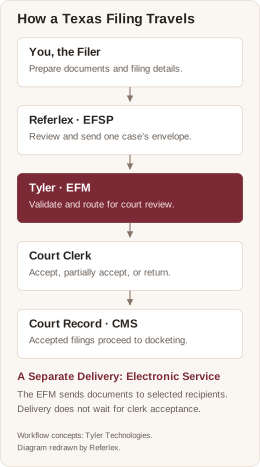
Filing-flow concepts courtesy of Tyler Technologies, “EFSP & CMS Integration Guide,” Filing Lifecycle (May 2025). Diagram redrawn by Referlex; it is an explanation of the workflow, not a reproduction of Tyler's artwork.
| Participant or System | What It Does | What You See in Referlex |
|---|---|---|
| Filer | Chooses the court, prepares documents, identifies parties, and authorizes submission. | Your connected identity and the information you enter. |
| Referlex, the filing interface | Collects your choices, checks required information, requests fees, sends the envelope, and presents responses. | The filing wizard, saved drafts, filing records, and notices. |
| Tyler's EFM | Coordinates filing delivery, court configuration, review processing, payment, and electronic service. | Court choices, fee responses, envelope identifiers, and status updates. |
| Court clerk | Reviews the submission and accepts or returns/rejects filings with an explanation. | Clerk decisions, comments, and available stamped documents. |
| Court case management system, or CMS | Maintains the court's case record and supports case lookup and docketing where integrated. | Returned case information and the case number associated with the filing. |
| Service recipient | Receives documents through the selected service contact. | Recipient names, addresses, and available delivery information. |
The EFM and the court's CMS are different systems. A case search can fail because one court's CMS is unavailable even while other courts and other eFileTexas functions work. Courts also differ in how their case records connect to the EFM. A lookup result is not a complete statewide docket search.
From Draft to Court Record
A draft is work you are preparing. An envelope is the package sent to eFileTexas for one court case. A filing is the item or event you ask the court to record, identified by a filing code. Documents belong in the slots defined for that filing, such as a lead document, proposed order, or supporting attachment.
In Tyler's system, an envelope can contain multiple filings for the same case. In Referlex's current wizard, you choose a filing code and populate that code's document slots. Do not assume that combining unrelated pleadings into one PDF creates separate filings, or that you can combine different cases in one submission.
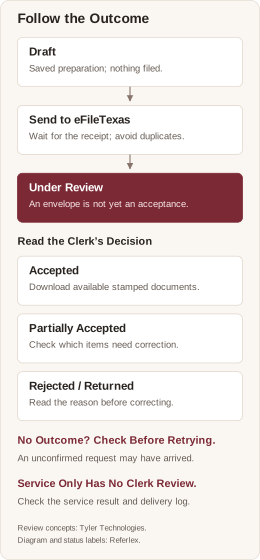
Review and docketing concepts courtesy of Tyler Technologies, “Odyssey File & Serve EFSP Specification,” Electronic Filing API Business Process. Diagram redrawn by Referlex with Referlex's draft and delivery-status terminology.
The usual sequence is:
- Prepare your documents and select the correct case and filing information.
- Review the documents, recipients, payment account, and any available fee quote.
- Confirm the review statement and select the final filing button.
- Referlex sends the envelope. A receipt or envelope number establishes what the system reported receiving; it does not itself mean that the clerk accepted the filing.
- The clerk reviews the filing. Accepted documents proceed through stamping and docketing as applicable. Returned or rejected items require attention to the reason given.
- Review the outcome, download available documents, and retain your records.
Electronic service is a separate part of this process. It can occur before the clerk's decision. A returned court filing does not mean recipients never received its documents.
Court Rules, Filing Dates, and Availability
The choices in the website describe the transaction; they do not decide jurisdiction, the correct pleading, service obligations, or a deadline. Review the rules for the kind of court and proceeding involved. District and county civil practice, justice court practice, appellate practice, and criminal proceedings do not all use the same rules. The Texas Judicial Branch Rules & Standards page links the current statewide rules and local rules resource.
A draft-save time, the time Referlex sends a request, an EFM receipt time, and a document's file stamp are different events. Keep the receipt and stamped document. Do not use the list's “Today” grouping as proof of a legal filing date. Referlex displays many activity times in your browser's local timezone.
Online submission does not imply immediate clerk review or uninterrupted availability of every court's systems. If a deadline is approaching and a service is unavailable, preserve the error and attempt details and consult the applicable court procedure. The website does not calculate an extension or guarantee that a later correction keeps the original filing date.
Reference and Attribution
This guide describes the Referlex website as reviewed on October 27, 2026. Court configuration and available actions can differ by account and court.
The Texas workflow and diagrams draw on Tyler Technologies' EFSP & CMS Integration Guide (May 2025), Glossary, and Odyssey File & Serve EFSP Specification, particularly the filing business process, case identification, review, docketing, and payment sections in the ECF5 documentation bundle dated July 9, 2026. Tyler's CMS integration materials explain differences in case lookup and docketing between courts. These are integration references; the instructions above describe Referlex's own screens. The diagrams are original Referlex redrawings, with workflow concepts credited courtesy of Tyler Technologies.
For public reference, use the eFileTexas FAQs, Texas court rules and standards, and JCIT Technology Standards. Court-specific instructions and the applicable rules govern the filing itself.